Public-tool workflow
Find METARs and TAFs on AviationWeather.gov
A practical station-lookup workflow, tested in a browser on desktop and mobile. Includes a dated screenshot and the limits of this check.
By Nick Rae · Published
Public browser task checked October 17, 2026 on the NOAA/NWS site, without an account. Station lookup, the TAF and Decoded controls, a three-hour history and restored URL settings were tested at desktop and mobile sizes. This checks website behavior; it does not validate weather accuracy or a complete preflight briefing.
A quick route to station reports
The Aviation Weather Center provides a public web page for METAR and TAF lookup. For a quick station check, the text page avoids opening the graphical map first. The workflow below uses KSFO as a repeatable interface example, without an account or a paid subscription.
The aim is to find the report, its time and the available display controls. The example is a website usability check, not a weather interpretation or a flight decision.
Sources: NOAA/NWS Aviation Weather Center: METAR and TAF lookup; Aviation Weather Center: product information and METAR help.
Load a station and include its TAF
In the test, entering KSFO and selecting TAFs returned both products. The page showed a separate observation time for the METAR and forecast periods for the TAF. No conclusion about flying conditions is made here.
- Open AviationWeather.gov. Under “Text METARs and TAFs,” follow the data-page link, or use the METAR and TAF page linked in the sources below.
- Enter a four-letter ICAO station identifier in the IDs field. The test used KSFO.
- Leave METARs selected, select TAFs if you want both products, and press Load.
- Check that the returned station matches your request. Read the report time and the forecast period rather than relying only on the page’s “Last updated” time.
Sources: NOAA/NWS Aviation Weather Center: METAR and TAF lookup; Aviation Weather Center: product information and METAR help.
Compare the raw and decoded views
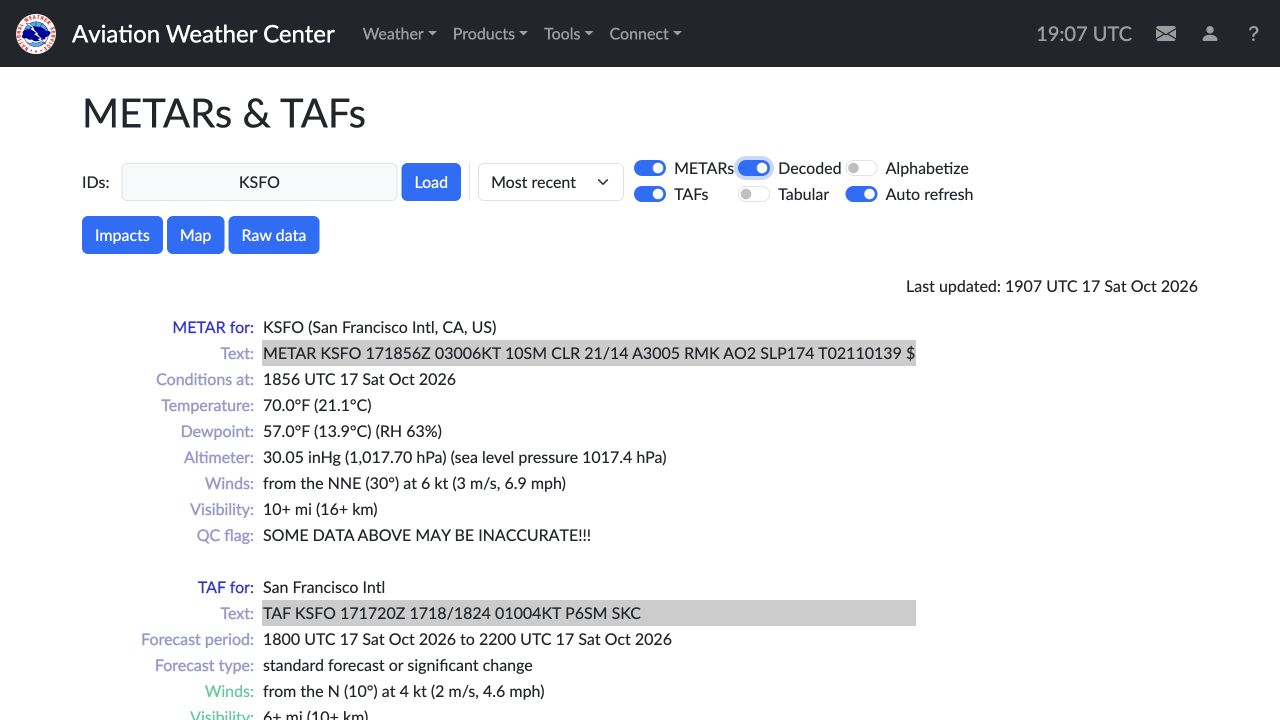
The initial raw view displayed the coded reports. Turning on Decoded produced labeled fields while retaining the original report text beside them. This makes it possible to compare the presentation without losing the underlying message.
A limitation was visible during this check: one decoded METAR included a QC warning that some displayed data may be inaccurate. The screenshot preserves that warning. A readable decoded table is not proof that every value is reliable.
Sources: Aviation Weather Center: product information and METAR help.
Check history and restore your selections
To inspect recent observations, choose a range such as “past 3 hours” and press Load. In this test that selection returned three observation records. The number available can vary by station and reporting activity.
Reloading the resulting URL restored KSFO, the three-hour selection, TAFs and Decoded. The link preserves the query settings; it does not freeze a weather snapshot. Opening it later can return different reports.
At 375 pixels wide, the station controls wrapped and remained usable. Some long report text and decoded fields were not fully visible in the initial mobile view. The same lookup worked at a 1280-pixel desktop width. A wider display is useful for comparing long reports.
Sources: NOAA/NWS Aviation Weather Center: METAR and TAF lookup.
What this test leaves open
For choosing a web reference, the observed strengths are a direct station lookup, raw and decoded views, visible report times and URL settings that survive a reload. Its scope is narrower than an EFB or a complete planning and briefing service.
- Weather observations, forecasts and quality-control flags were displayed, but their meteorological accuracy was not independently validated.
- This check did not test every station, maps, outages, offline use or an entire route briefing.
- A successful single-station lookup is not a complete preflight process. Use current official guidance and the other information required for your flight.
Sources: Aviation Weather Center: product information and METAR help; Aviation Weather Center: official site help.
Sources
Tools in this guide
- AviationWeather.gov (NWS) — pricing, access notes and vendor sources
Browse related categories
Nick sells aviation study workbooks that compete with some listed study tools. Read the ownership and research disclosure. Use current official publications and instructor guidance before relying on an aviation tool.